The Muskan Club deposit system is designed to provide users with multiple payment options and a straightforward account funding experience. Before making a deposit, users should review the available payment channels, minimum and maximum transaction limits, and applicable bonus offers. Understanding these details can help ensure that deposits are processed correctly and that users are aware of the requirements associated with their selected payment method.
Available Deposit Methods and Payment Channels
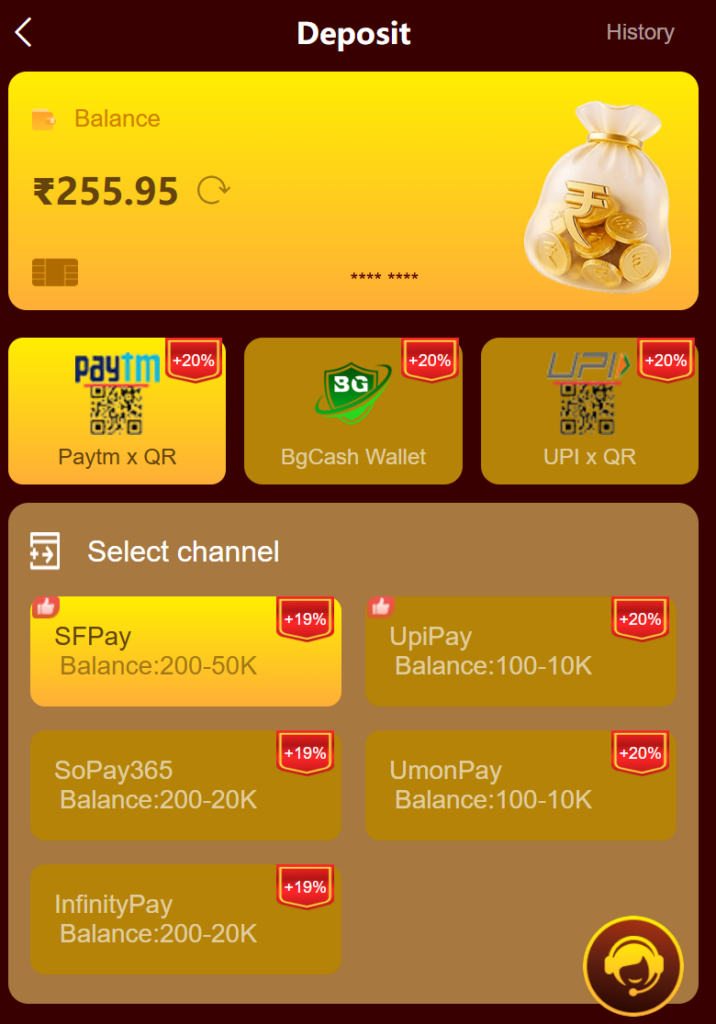
Muskan Club supports several payment channels to accommodate different user preferences. Depending on availability and account eligibility, users may choose from payment options such as QR-based payments, wallet transfers, and UPI-supported transactions. Each payment channel may have its own transaction limits and processing requirements. Users are encouraged to verify current limits before initiating a transaction to avoid delays or unsuccessful deposits.
Supported Payment Options
| Payment Method | Promotional Bonus |
|---|---|
| Paytm via QR | Up to 20% |
| BgCash Wallet | Up to 20% |
| UPI via QR | Up to 20% |
Payment Channel Limits
| Channel | Transaction Range |
| SFPay | ₹200 – ₹50,000 |
| UpiPay | ₹100 – ₹10,000 |
| SoPay365 | ₹200 – ₹20,000 |
| UmonPay | ₹100 – ₹10,000 |
| InfinityPay | ₹200 – ₹20,000 |
Deposit Bonus Structure and First Deposit Benefits
Eligible users may receive bonus credits based on their selected deposit amount and current promotional offers. Bonus structures are typically displayed before completing a transaction, allowing users to review the expected deposit value and any additional credits. The actual bonus amount credited to an account may depend on ongoing promotional campaigns, account status, and compliance with platform terms and conditions.
Example Deposit Bonus Table
| Deposit Amount | Bonus Credit |
| ₹200 | ₹38 |
| ₹300 | ₹58 |
| ₹500 | ₹78 |
| ₹1,000 | ₹148 |
| ₹5,000 | ₹688 |
| ₹50,000 | ₹5,888 |
Example Calculation
If a user deposits ₹300 and qualifies for a ₹58 first-deposit bonus:
- Deposit Amount: ₹300
- Bonus Credit: ₹58
- Total Value Received: ₹358
This example is provided for informational purposes and may vary depending on current promotional terms.
How to Complete a Deposit Successfully
To ensure successful processing, users should follow the deposit instructions carefully. Deposits are generally linked to a specific transaction order generated by the platform. The transferred amount must match the amount shown in the order. Any mismatch between the order amount and the transferred amount may result in processing delays or unsuccessful crediting of funds.
Deposit Steps
- Select a preferred payment channel.
- Choose or enter a deposit amount.
- Review any available bonus information.
- Create the deposit order.
- Complete the payment using the selected method.
- Wait for confirmation and account crediting.
Important Recharge Instructions
Following platform instructions is essential for smooth transaction processing. Users should carefully review payment details before confirming a transfer. Any changes made after the transaction has been initiated may affect processing times or account crediting. Maintaining accurate payment information can help reduce potential issues and improve the overall deposit experience.
Important Guidelines
- Complete payment before the transaction timer expires.
- Ensure the transfer amount exactly matches the created order.
- Verify payment details before confirming the transaction.
- Keep transaction records until the deposit is credited.
- Follow all platform instructions during the payment process.
Common Deposit Issues and Solutions
Occasionally, users may encounter issues such as delayed credits, incorrect transfer amounts, or expired payment orders. Most of these situations can be avoided by carefully following the deposit instructions and verifying payment information before submitting funds. If a deposit is not credited within the expected timeframe, users should contact customer support and provide relevant transaction details for assistance.
Troubleshooting Guide
| Issue | Suggested Solution |
| Deposit not credited | Verify transaction details |
| Incorrect transfer amount | Contact support immediately |
| Expired payment order | Create a new deposit order |
| Payment verification delay | Wait for processing confirmation |
| Channel unavailable | Select an alternative payment option |
Security and Transaction Verification
For account security and transaction accuracy, users may be required to complete verification procedures. These measures help protect accounts, prevent unauthorized activity, and ensure that transactions are processed correctly. Users should always use accurate account information and complete any requested verification steps according to platform requirements.
Frequently Asked Questions
What is the minimum deposit amount?
Minimum deposit limits vary depending on the selected payment channel. Users should review the current limits displayed before initiating a transaction.
How are deposit bonuses calculated?
Bonus amounts are generally determined by the selected deposit value and any active promotional offers available at the time of the transaction.
What happens if I transfer the wrong amount?
A transfer amount that does not match the generated order may cause processing issues. Users should contact customer support for assistance if this occurs.
Can I cancel a deposit after payment?
Users should review platform policies regarding transaction cancellation and order management before initiating any payment.
Conclusion
The Muskan Club deposit system offers multiple payment methods, flexible transaction limits, and bonus opportunities for eligible users. By understanding the available payment channels, reviewing bonus structures, and following recharge instructions carefully, users can help ensure a smooth and efficient deposit experience. Always review the latest terms, payment limits, and verification requirements before completing any transaction.